Incident and Delay Information
Information about incidents and performance degradation of AmiVoice API is provided on the following Statuspage. This section introduces this Statuspage.
Overview
The Statuspage aggregates and provides information on current incidents, service-specific incident information, and detailed performance information for each engine. It also has a feature to send email notifications to registered addresses in case of incidents or performance degradation, and these text notifications are also posted.
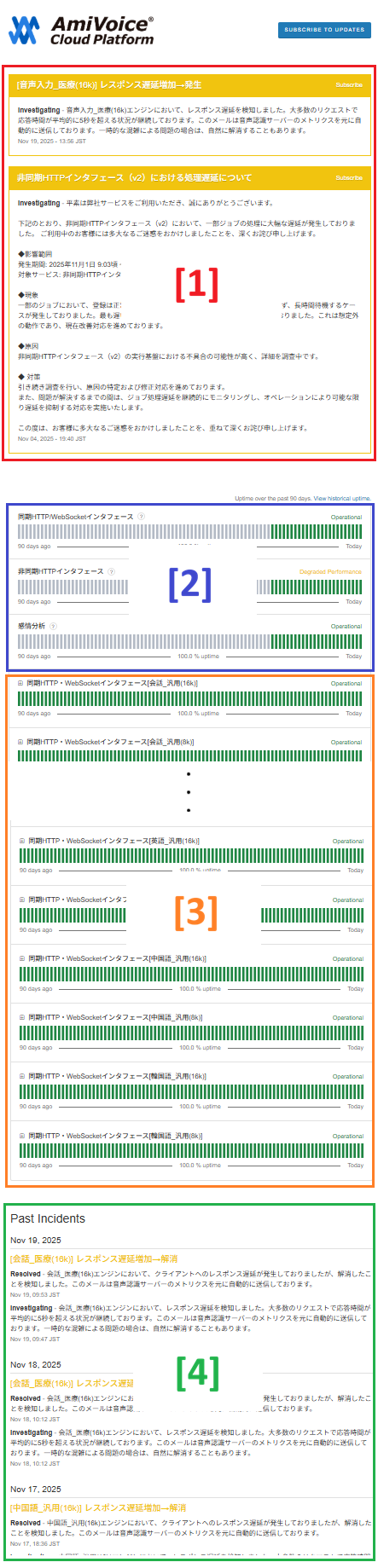
The numbers [1] to [4] in the following screenshot correspond to the numbers listed in the item names in the explanation below.
Types of Service Statuses
On the Statuspage, the status of services is represented by the following statuses:
- Operational - Normal operation: No issues
- Degraded Performance - Performance degradation: Operating but experiencing delays, etc.
- Partial Outage - Partial stoppage: Some functions are unavailable
- Major Outage - Large-scale stoppage: Service is unavailable
- Under Maintenance - Undergoing maintenance: Planned maintenance work in progress
Types of Incident Statuses
On the Statuspage, the status of incidents is represented by the following statuses:
- Investigating - Under investigation: The problem has been confirmed, but the cause and scope of impact are being investigated
- Identified - Identified: The cause of the problem has been identified and response has begun
- Monitoring - Under monitoring: The problem has been resolved and normal operation is being monitored
- Resolved - Resolved: The problem has been resolved
Information Details
Currently Occurring Incidents [1]
Information about currently occurring incidents is posted. In addition to content similar to the incident information posted on the news page (https://acp.amivoice.com/en/news/), performance degradation from the Detailed Information by Engine is also posted. The former is also reflected in the Incident Occurrence Status by Service.
Types of Incidents and Colors
The color of the displayed box differs depending on the type of incident.
- Operational - Normal operation: Green (when all services are applicable)
- Degraded Performance - Performance degradation: Yellow
- Partial Outage - Partial stoppage: Brown
- Major Outage - Large-scale stoppage: Red
- Under Maintenance - Undergoing maintenance: Blue
Incident Occurrence Status by Service [2]
The incident occurrence status for three types - Synchronous HTTP interface and WebSocket interface, Asynchronous HTTP interface, and sentiment analysis - is visually displayed. Each colored bar (green, red, etc.) represents the status for one day, and you can check the status for each day over the past 90 days including today. When you hover the mouse cursor over a bar, the details for that day are displayed. If you want to check information from more than 90 days ago, please click on View historical uptime in the upper right.
Meaning of Bar Colors
The color of the bars changes as follows depending on the duration of Partial Outage or Major Outage that occurred on that day. However, Partial Outage is calculated with a factor of 0.3. Degraded Performance and Under Maintenance are not considered.
- 0 minutes: Green
- 1 to 20 minutes: Yellow-green to yellow
- 20 to 40 minutes: Yellow to orange
- 40 to 60 minutes: Orange to red
- 60 minutes or more: Red
Current Status
The current status of each service is displayed in the upper right of the bar sequence. For the types of statuses displayed, please see Types of Service Statuses.
Detailed Information by Engine [3]
Detailed information for each engine, automatically detected from AmiVoice API server logs, is visually displayed. It mainly represents performance status. Each colored bar (green, red, etc.) represents the status for one day, and you can check the status for each day over the past 90 days including today. When you hover the mouse cursor over a bar, the details for that day are displayed.
Clicking on the area where the engine name is displayed will open the details. The status is similarly displayed with bars for "接続障害" (Connection Failure), "接続遅延" (Connection Delay), and "レスポンス遅延(WebSocket)" (Response Delay (WebSocket)) respectively.
For the detection criteria for each, please see Performance Degradation Detection Criteria, and for the colors of each bar, please see Meaning of Bar Colors. If you want to check information from more than 90 days ago, please click on View historical uptime in the upper right of the Incident Occurrence Status by Service.
Performance Degradation Detection Criteria
Performance degradation is automatically detected from AmiVoice API server logs for each engine based on the following criteria:
- Connection Failure: When internal server communication errors during request processing for the engine in question occur 10 times or more in the last 1 minute
- Connection Delay: When the time taken to connect to the engine in question is 5 seconds or more for 5% or more of requests in the last 1 minute
- Response Delay (WebSocket): When the average response time for sessions where recognition results were returned per speech segment for the engine in question, excluding the 5% with the slowest responses, is 5 seconds or more continuously for the last 5 minutes. Note that requests where the response was slow due to client-side factors, such as when the quality of the audio data was significantly poor and speech recognition processing took time, may also have an impact.
These detection criteria may be changed without notice.
Current Status
The current status of each engine is displayed in the upper right of the bar sequence. For the types of statuses displayed, please see Types of Service Statuses.
Past Incidents [4]
A history of incidents and performance degradations that have occurred in the past is posted up to 14 days (2 weeks) ago. The color of the displayed text differs depending on the type of incident, etc. For the correspondence between types and colors, please see Types of Incidents and Colors. If you want to check the history from further in the past, please click on Incident History at the bottom.
Email Notifications
You can receive notifications from the Statuspage via email. Notification emails are sent from acp-status@m00.advanced-media.co.jp.
Notification Email Destination
The destination for notification emails is the email address registered as the "Failure Notification Contact Information Email Address" under "Alternative Contact Information Email Address" on the MyPage.
Notification Content
In notification emails, you can receive the following notifications:
- Occurrence information for Currently Occurring Incidents (including updates)
- Occurrence information for performance status degradation posted in Detailed Information by Engine (including updates)